This article is one of the four articles written to easily understand the Data Vault architecture. Part two covers the Data Vault Staging environment, Hash Key computations and preparation of the staging data for the Data Vault loading.
Overview of the Data Vault Staging
The main purpose of the staging environment is to reduce the workload on the source systems. Data extraction from the source systems should be performed as quick as possible. Therefore, once the data is extracted from the source system, it should be loaded into the staging environment quickly, ideally having the same data format and structure would make the data load faster. After that, validations, transformations, data type changes, aggregations or computations required for the Data Vault can be done.
One important thing is, staging area should be designed to store the data loaded for a reasonable short-term, not all the historic loads. Data load errors should be handled to prevent the data loss before deletion.
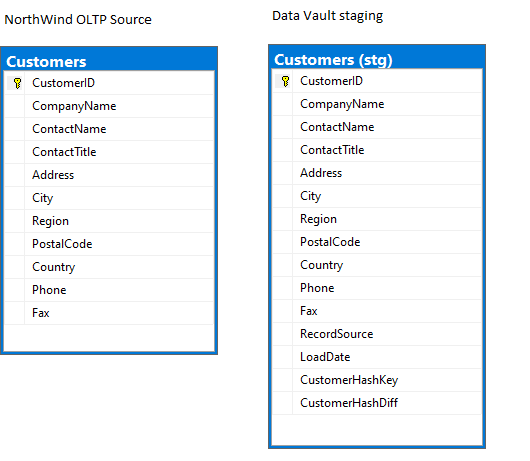
Below is an example of the table structures from the OLTP source and staging environments. Staging environment table structure is exactly same as the OLTP source table, but with few additional columns. These additional columns are the key in the Data Vault loading from the staging environment. Each additional column and its significance in the Vault loading are explained in the subsequent articles.
Hash key and Hash difference
Hash keys are an alternative for the sequence numbers that are used traditionally. Although one of the main reasons to use hash keys is to overcome the main drawbacks associated with the sequence numbers, hash keys provides the exact same hash value for the same business key at any time. This would avoid lookups and caching required when loading into the Data Vault that are required while using the sequence numbers.
Hash difference is mainly used to detect the change in the non-key columns of the table. To record the history of the changes performed on a customer record, each column of the source customer record should be compared with the same column in the destination. This might be easier when the data volume is low, but when the data is huge and the number of columns to be compared are relatively high, comparison might take longer in most cases. To avoid this drawback, hash difference values are used to reduce the comparison time and to make change detection easy.
Below is an example to generate Hash key and Hash difference binary values from the data in the table. [ID] is the key that identifies the customer record in this case, therefore Hash key value has been produced on the [ID] column. Other columns refer to the descriptive date of the customer, Hash Difference is used to detect the changes on the descriptive data. When the customer’s title has changed to ‘Mr.’ to ‘Dr.’, hash key value has been changed.
;WITH cte_Customer AS
 (
 SELECT 10001 AS [ID],'Mr.' AS [Title], 'John' AS [FirstName], 'Wick' AS [LastName]
 UNION
 SELECT 10001 AS [ID], 'Dr.' AS [Title], 'John' AS [FirstName], 'Wick' AS [LastName]
 )
 SELECT [ID],[Title],[FirstName],[LastName], HASHBYTES('MD5',CAST([ID] AS VARCHAR)) AS [HashKey], HASHBYTES('MD5',TRIM([Title])  + '^' + TRIM(ISNULL([FirstName],'')) + '^' + TRIM(ISNULL([LastName],''))) AS [HashDiff]
 FROM cte_Customer
 ;
| ID | Title | FirstName | LastName | HashKey | HashDiff |
| 10001 | Mr. | John | Wick | 0xD89F3A35931C386956C1A402A8E09941 | 0x5AFD93F028AA569BB6FDB2BB2D49C7F2 |
| 10001 | Dr. | John | Wick | 0xD89F3A35931C386956C1A402A8E09941 | 0xEC96793B9CFCD784D6BBD9C57049D3BA |
Record source and Load date
The main purpose of the record source and load date are used to precisely track the source of the record and the date the data has been sent/extracted from the source system (in most cases).
When two or more sources are involved, it could be difficult to backtrack the origin of the data. Therefore, storing the source of the data would be helpful.
Although load date helps to identify the record timing, it is used as part of the primary key while satellite loading to track record changes.
Data Vault Staging ER diagram
Staging load from OLTP Source(sample)
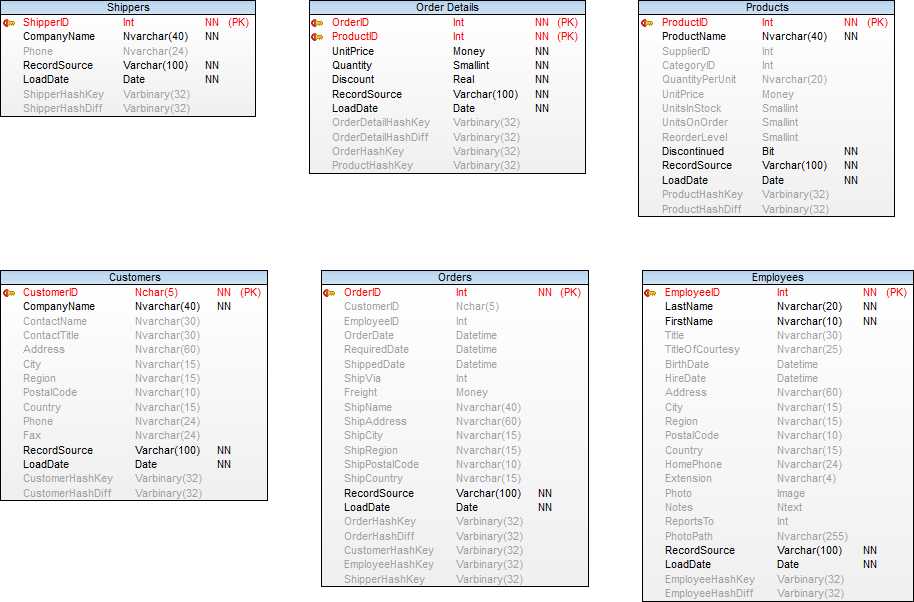
All the staging tables in the ER diagram above should be loaded like the customer table below.
 INSERT INTO [DataVaultStaging].[stg].[Customers]
 (      [CustomerID]
       ,[CompanyName]
       ,[ContactName]
       ,[ContactTitle]
       ,[Address]
       ,[City]
       ,[Region]
       ,[PostalCode]
       ,[Country]
       ,[Phone]
       ,[Fax]
       ,[RecordSource]
       ,[LoadDate]
 )
 SELECT [CustomerID]
       ,[CompanyName]
       ,[ContactName]
       ,[ContactTitle]
       ,[Address]
       ,[City]
       ,[Region]
       ,[PostalCode]
       ,[Country]
       ,[Phone]
       ,[Fax]
      ,'Northwind_Sqldb' AS [RecordSource]
      ,CAST(GETDATE() AS DATE) AS [LoadDate]
 FROM [NORTHWND].[dbo].[Customers]
 ;
Hash Key computations in the staging (sample)
Hash keys should be derived on all the staging tables in the ER diagram like the customer hash keys below.
UPDATE [DataVaultStaging].[stg].[Customers]
SET [CustomerHashKey] = HASHBYTES('MD5',[CustomerID])
;

UPDATE [DataVaultStaging].[stg].[Customers]
SET [CustomerHashDiff] = HASHBYTES('MD5', TRIM([CompanyName]) +  '^' + TRIM(ISNULL([ContactName],''))  +  '^' + TRIM(ISNULL([ContactTitle],'')) +  '^' + TRIM(ISNULL([Address],''))      +  '^' + TRIM(ISNULL([City],''))         +  '^' + TRIM(ISNULL([Region],''))       +  '^' + TRIM(ISNULL([PostalCode],''))   +  '^' + TRIM(ISNULL([Country],''))      +  '^' + TRIM(ISNULL([Phone],''))        +  '^'                    + TRIM(ISNULL([Fax],''))
)
;
This concludes the post. In the next article, we will look at the Data Vault environment.

 Simple SQL BI blogs