This article is one of the four articles written to easily understand the Data Vault architecture. Part three covers the step by step loading of the Data Vault key entities with examples.
Hub load
Loading hub is the first and the important step in the data vault loading as hubs hold the business keys of the entities and forms the relationship between the links and satellites.
Basically, loading the hub is simple. Let’s look at the hub structure and the loading steps involved.
Structure of the hub
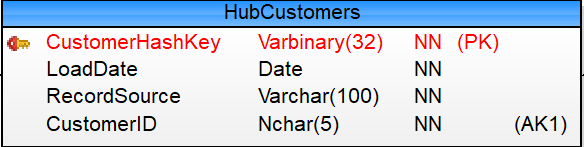
The basic structure of the hub contains:
- Hash key
- Date loaded
- Source of the record
- Business Key
Example hub structure is below.
Script that has been used to create the hub
Below is the table creation script used to create the hub.
CREATE TABLE [raw].[HubCustomers](
               [CustomerHashKey] [varbinary](32) NOT NULL,
               [LoadDate] [date] NOT NULL,
               [RecordSource] [varchar](100) NOT NULL,
               [CustomerID] [nchar](5) NOT NULL,
  CONSTRAINT [PK_HubCustomers] PRIMARY KEY CLUSTERED
 (
               [CustomerHashKey] ASC
 )ON [PRIMARY],
  CONSTRAINT [UK_HubCustomers] UNIQUE NONCLUSTERED
 (
               [CustomerID] ASC
 )ON [PRIMARY],
 )ON [PRIMARY]
 ;
Script that has been used to load the hub
Loading the hub is done in one simple step as below. If the business key doesn’t exist in the hub when compared with the staging, insert the business key, its hash key and other columns as defined in the hub structure.
Sample code below.
INSERT INTO [DataVault].[raw].[HubCustomers]
  (
        [CustomerHashKey]
       ,[LoadDate]
       ,[RecordSource]
       ,[CustomerID]
  )
 SELECT Stg.[CustomerHashKey]
                 ,Stg.[LoadDate]
                 ,Stg.[RecordSource]
                 ,Stg.[CustomerID]
 FROM [DataVaultStaging].[stg].[Customers] Stg
 WHERE NOT EXISTS (                                                                             SELECT 1
FROM [DataVault].[raw].[HubCustomers] Hub
WHERE Hub.[CustomerID] = Stg.[CustomerID]
)
AND Stg.[LoadDate] = CAST(GETDATE() AS DATE)
;
Link load
Links are what determines the connection between various entities. Therefore, the link loading should occur after the hub loading.
Structure of the link
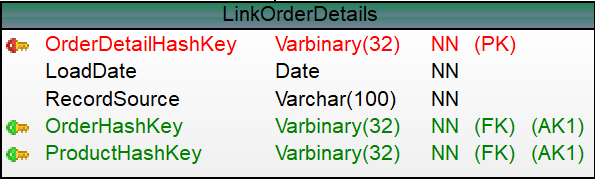
The basic structure of the link contains:
- Hash key for the business key combination
- Date loaded
- Source of the record
- Reference hub keys
Example link structure is below.
Script that has been used to create the link
Below is the table creation script used to create the link. Make sure the referenced hubs in the link table exists in before the physical link table is created.
 CREATE TABLE [raw].[LinkOrderDetails](
               [OrderDetailHashKey] [varbinary](32) NOT NULL,
               [LoadDate] [date] NOT NULL,
               [RecordSource] [varchar](100) NOT NULL,
               [OrderHashKey] [varbinary](32) NOT NULL,
               [ProductHashKey] [varbinary](32) NOT NULL,
  CONSTRAINT [PK_LinkOrderDetails] PRIMARY KEY CLUSTERED
 (
               [OrderDetailHashKey] ASC
 ),
  CONSTRAINT [UK_LinkOrderDetails] UNIQUE NONCLUSTERED
 (
               [OrderHashKey] ASC,
               [ProductHashKey] ASC
 )
 ) ON [PRIMARY]
 GO

 ALTER TABLE [raw].[LinkOrderDetails]  WITH CHECK ADD  CONSTRAINT [FK_LinkOrderDetails_HubProducts] FOREIGN KEY([ProductHashKey])
 REFERENCES [raw].[HubProducts] ([ProductHashKey])
 GO


 ALTER TABLE [raw].[LinkOrderDetails]  WITH CHECK ADD  CONSTRAINT [FK_LinkOrderDetails_LinkOrders] FOREIGN KEY([OrderHashKey])
 REFERENCES [raw].[LinkOrders] ([OrderHashKey])
 GO
Script that has been used to load the link
Loading the link is done like hub. If the business key combination doesn’t exist in the hub when compared with the staging, insert the business keys, a unique hash key produced on the combination of the business keys and other columns as defined in the link structure.
The one thing that occur before the Link loading is the Hub loading, so that the referenced Hash keys in the Link does exist in the Hub.
Sample code below.
 INSERT INTO [DataVault].[raw].[LinkOrderDetails]
  (
       [OrderDetailHashKey]
       ,[LoadDate]
       ,[RecordSource]
       ,[OrderHashKey]
       ,[ProductHashKey]
  )
 SELECT Stg.[OrderDetailHashKey]
       ,Stg.[LoadDate]
       ,Stg.[RecordSource]
       ,Stg.[OrderHashKey]
       ,Stg.[ProductHashKey]
 FROM [DataVaultStaging].[stg].[Order Details] Stg
 WHERE NOT EXISTS
(
SELECT 1
FROM [DataVault].[raw].[LinkOrderDetails] Link
WHERE Link.[OrderHashKey] = Stg.[OrderHashKey]
   AND Link.[ProductHashKey]        = Stg.[ProductHashKey]
)
AND Stg.[LoadDate] = CAST(GETDATE() AS DATE)
 ;
Satellite load
Satellites hold the descriptive data of an entity and the changes that occur to the descriptive data for the historical analysis. A satellite can only be linked to one hub or one link. Therefore the hub/link loading referenced by the satellite should occur before the satellite loading.
Structure of the satellite
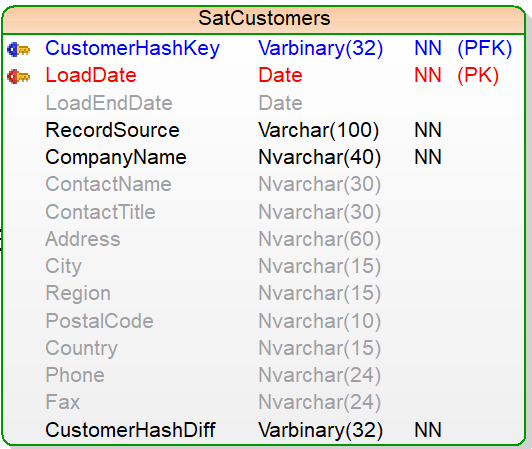
The basic structure of the satellite contains:
- Referenced hub/link key
- Date loaded
- Source of the record
- Hash difference value
- Load end date (applicable when the history of the record changes are to be determined)
- Descriptive data of the entity
Example satellite structure is below.
Script that has been used to create the satellite
Below is the table creation script used to create the satellite. Make sure the hub/link referenced in the satellite table exists in before the physical satellite table is created.
 CREATE TABLE [raw].[SatCustomers](
               [CustomerHashKey] [varbinary](32) NOT NULL,
               [LoadDate] [date] NOT NULL,
               [LoadEndDate] [date] NULL,
               [RecordSource] [varchar](100) NOT NULL,
               [CompanyName] [nvarchar](40) NOT NULL,
               [ContactName] [nvarchar](30) NULL,
               [ContactTitle] [nvarchar](30) NULL,
               [Address] [nvarchar](60) NULL,
               [City] [nvarchar](15) NULL,
               [Region] [nvarchar](15) NULL,
               [PostalCode] [nvarchar](10) NULL,
               [Country] [nvarchar](15) NULL,
               [Phone] [nvarchar](24) NULL,
               [Fax] [nvarchar](24) NULL,
               [CustomerHashDiff] [varbinary](32) NOT NULL,
  CONSTRAINT [PK_SatCustomers] PRIMARY KEY CLUSTERED
 (
               [CustomerHashKey] ASC,
               [LoadDate] ASC
 ) ON [PRIMARY]
 ) ON [PRIMARY]
 GO

 ALTER TABLE [raw].[SatCustomers]  WITH CHECK ADD  CONSTRAINT [FK_SatCustomers_HubCustomers] FOREIGN KEY([CustomerHashKey])
 REFERENCES [raw].[HubCustomers] ([CustomerHashKey])
 GO
Script that has been used to load the satellite
In this series, the Data Vault satellites that holds the descriptive data are loaded using two step procedure. Each satellite record is uniquely identified from the hash Key of the hub/link referenced in the Satellite and the load date (also the start date) of the satellite.
The one thing that occur before the satellite loading is the hub/link loading that are being reference in the satellite, so that the referenced Hash keys in the satellite does exist in the hub/link.
First step is to end-date the current satellite data that has changed. When an existing record with modified descriptive data appears in the staging, then the current satellite record should be end-dated (modified from the default or null). Difference in the Hash difference value implies the descriptive data of the satellite has changed.
Sample code below.
 UPDATE Sat
 SET Sat.[LoadEndDate] = DATEADD(d,-1,Stg.LoadDate)
 FROM [DataVaultStaging].[Stg].[Customers] Stg
       INNER JOIN [DataVault].[raw].[SatCustomers] Sat
           ON  Sat.[CustomerHashKey]       = Stg.[CustomerHashKey]
 WHERE Sat.[CustomerHashDiff] <> Stg.[CustomerHashDiff]
               AND Sat.[LoadEndDate] IS NULL
               AND Sat.[LoadDate] < Stg.LoadDate
 ;
Second step is to insert the new Satellite records that never existed, and the modified records that were end-dated in the above step with a new unique combination, and with the load end date to a default value or null.
Sample code below.
INSERT INTO [DataVault].[raw].[SatCustomers]
 (
                  [CustomerHashKey]
                 ,[LoadDate]
                 ,[RecordSource]
                 ,[CompanyName]
                 ,[ContactName]
                 ,[ContactTitle]
                 ,[Address]
                 ,[City]
                 ,[Region]
                 ,[PostalCode]
                 ,[Country]
                 ,[Phone]
                 ,[Fax]
                 ,[CustomerHashDiff]
 )
 SELECT Stg.[CustomerHashKey]
       ,Stg.[LoadDate]
       ,Stg.[RecordSource]
       ,Stg.[CompanyName]
       ,Stg.[ContactName]
       ,Stg.[ContactTitle]
       ,Stg.[Address]
       ,Stg.[City]
       ,Stg.[Region]
       ,Stg.[PostalCode]
       ,Stg.[Country]
       ,Stg.[Phone]
       ,Stg.[Fax]
       ,Stg.[CustomerHashDiff]
 FROM [DataVaultStaging].[Stg].[Customers] Stg
            LEFT OUTER JOIN [DataVault].[raw].[SatCustomers] Sat
                ON Sat.[CustomerHashKey] = Stg.[CustomerHashKey]
 WHERE
(
 Sat.[CustomerHashDiff] <> Stg.[CustomerHashDiff]
 OR
 Sat.[CustomerHashKey] IS NULL
 )
 AND Stg.[LoadDate] = CAST(GETDATE() AS DATE)
 ;
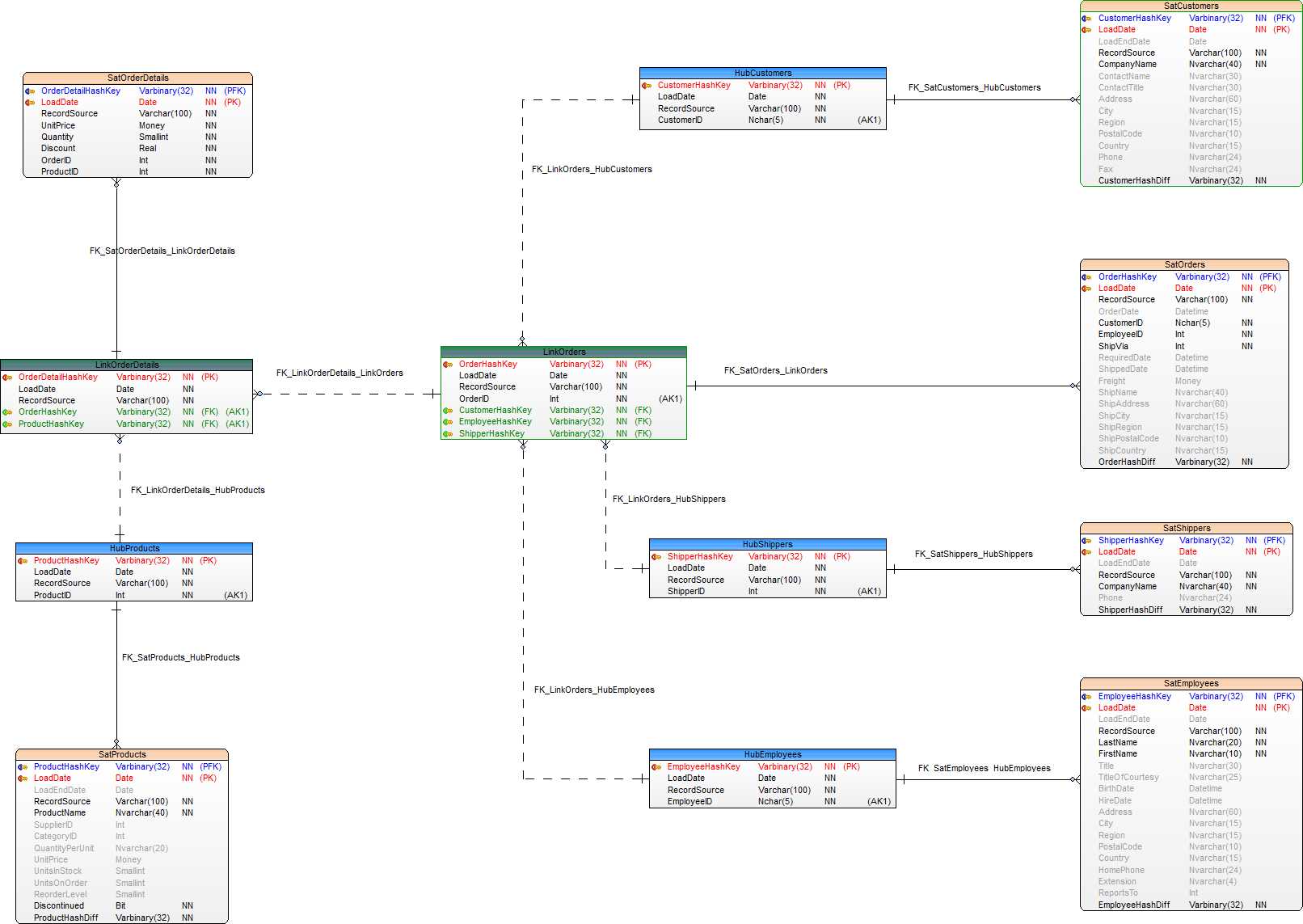
Data Vault ER diagram
Data Vault ER model that was developed for this series is below.
This concludes the post. In the next article, we will look at the Information mart environment.

 Simple SQL BI blogs